What changes if someone leaves after round one, then returns for round three? This product demonstration follows the actual generated teams, not just the group sizes.
All eight participant labels are fictional. No workshop took place. The test marked rounds complete to check what Team Rotation preserves. It does not measure learning, teamwork or participant satisfaction.
Build the same setup
Open Team Rotation in Team Picker. Paste these labels, choose 2 for Groups per round and 3 for Rounds, then select Build schedule.
Player A
Player B
Player C
Player D
Player E
Player F
Player G
Player H
The recorded run was checked on 14 November 2026. These inputs reproduce the procedure, not identical teams: each build uses randomness. The recorded demonstration plans (opens in a new tab) contain all three actual outputs and the tested build identifier, so you can check the counts below.
What changed in this run
- The first build placed all eight labels in each of three rounds, in two groups of four. Letters below abbreviate Player A through Player H. The first round was C, E, B, D together, and F, A, G, H together.
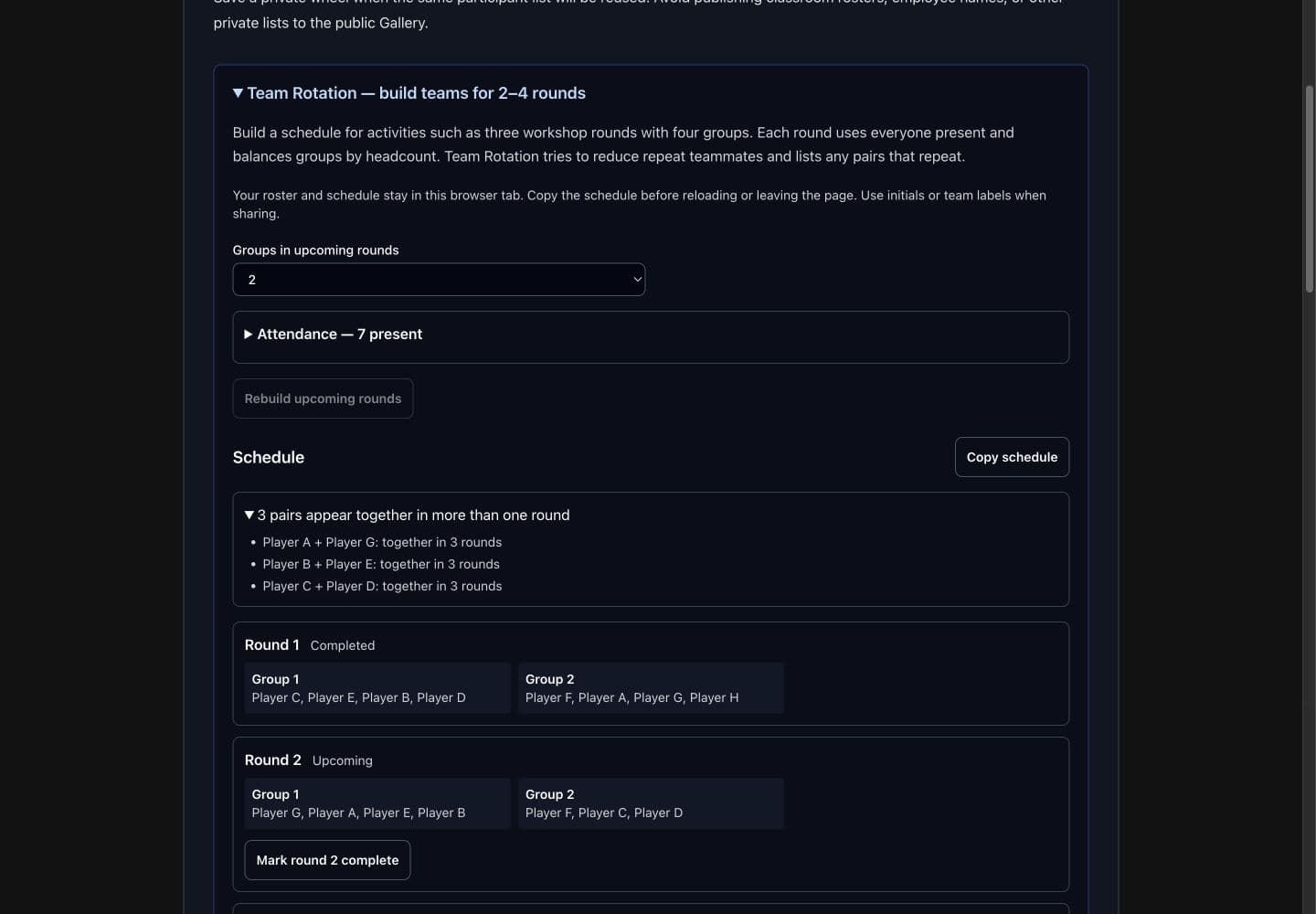
- Select Mark round 1 complete. Open Attendance, uncheck Player H, then select Rebuild upcoming rounds. Until rebuilding, the previous schedule stays visible and Copy schedule is disabled. The rebuild kept round one exactly and replaced rounds two and three. Each upcoming round now contained seven labels, in groups of four and three.
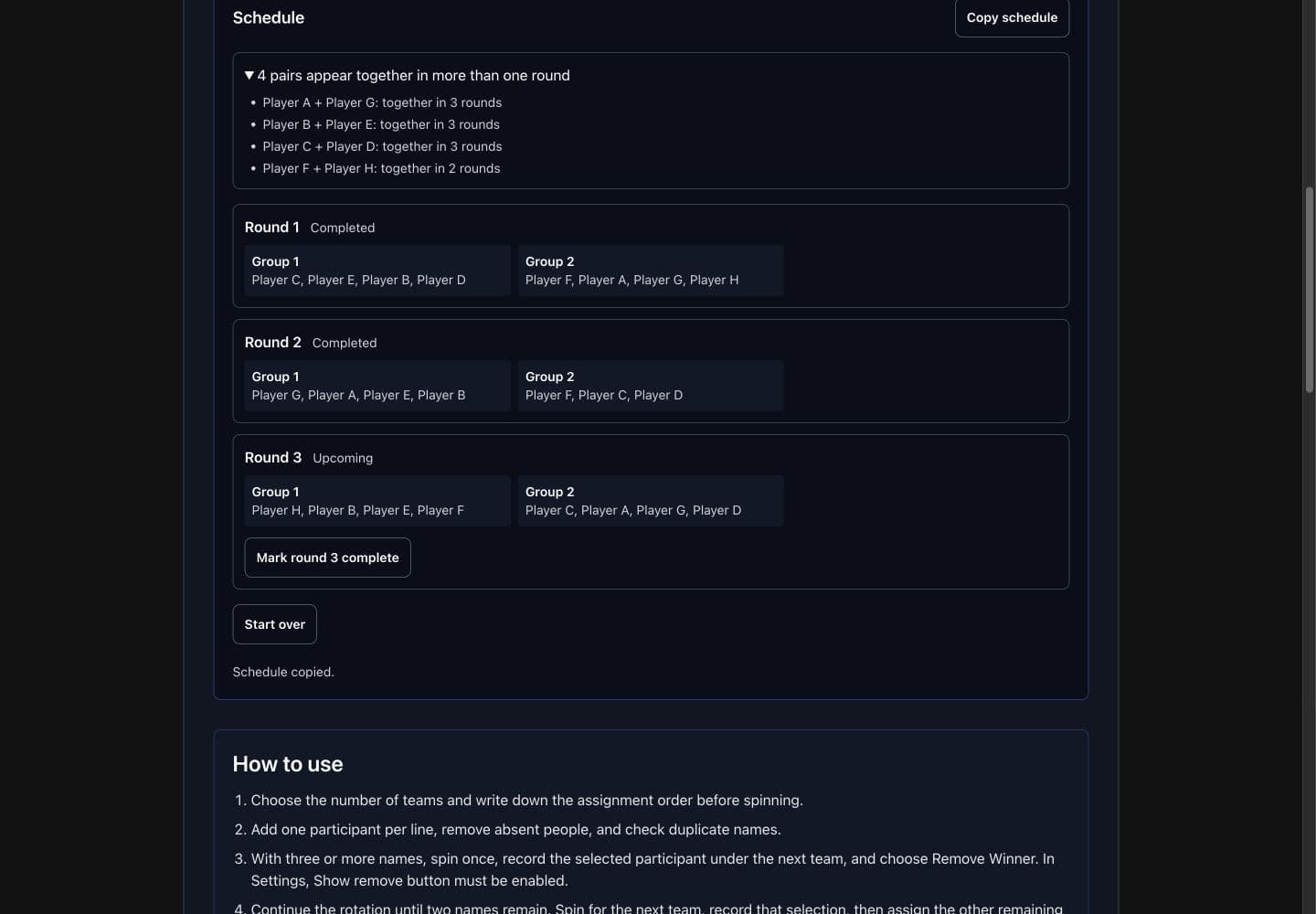
- Select Mark round 2 complete to model that round being finished. Check Player H again and rebuild. Only round three changed, back to two groups of four. Rounds one and two kept their exact memberships. H returned for round three; the tool did not add H retrospectively to round two.
| Saved version | Round sizes: 1 / 2 / 3 | Distinct pairs that repeat | Extra pair occurrences |
|---|---|---|---|
| Initial eight-person plan | 4+4 / 4+4 / 4+4 | 4 | 8 |
| H absent after round one | 4+4 / 4+3 / 4+3 | 3 | 6 |
| H returns after round two | 4+4 / 4+3 / 4+4 | 4 | 7 |
Every label present in a given round appeared exactly once. Group sizes differed by at most one. These are checks of this recorded run, not predictions of the next random plan.
Changing attendance does not silently rewrite a completed round. Be careful when marking one complete: it is a host decision, not an attendance check or confirmation that an activity really happened. Start over offers to clear the whole schedule, including completed rounds; it is not the way to update one absence. If a pending attendance edit is wrong, Discard pending changes restores the previous settings.
Why repeat teammates can be unavoidable
With eight people, there are 28 possible unordered pairs. A group of four contains six pairs, so two groups produce 12 pair occurrences per round. Across three rounds that is 36 pair occurrences. At least eight must therefore be occurrences beyond a pair’s first meeting, even before considering other restrictions.
The initial plan’s repeated pairs were A–H, B–C, D–E and F–G. Each appeared in all three rounds. That is four distinct repeated pairs, but eight extra occurrences: each pair contributes two occurrences after its first.
The UI reports distinct pairs and how many rounds each pair shares. For the final plan below, it reported A–G, B–E and C–D together in three rounds, plus F–H together in two. That is four repeated pairs and 2 + 2 + 2 + 1 = 7 extra occurrences. An independent count of every within-group pair matched the displayed report.
Do not read the sequence 8 → 6 → 7 as an improvement score. The total pair occurrences also changed, from 36 → 30 → 33, because the number present changed. Team Rotation tries to reduce repeats through a bounded search; it does not promise a globally optimal plan, no repeats, or balanced abilities. Its repeat report covers the whole displayed schedule, including upcoming rounds—not verified meetings between real people.
The actual copied schedule
After H returned, Copy schedule produced this text. The two Completed labels are the flags set during the demonstration; round three remained Upcoming.
Team Rotation schedule

Round 1 · Completed
Group 1: Player C, Player E, Player B, Player D
Group 2: Player F, Player A, Player G, Player H

Round 2 · Completed
Group 1: Player G, Player A, Player E, Player B
Group 2: Player F, Player C, Player D

Round 3 · Upcoming
Group 1: Player H, Player B, Player E, Player F
Group 2: Player C, Player A, Player G, Player D
For a real activity, check the actual groups before announcing them. Decide how to handle access needs, experience, schedules and participant requests yourself. Balanced headcounts do not settle those questions. If you manually change a copied plan outside the tool, its on-screen repeat report will not reflect those edits.
Before you announce or leave
- Check attendance for the upcoming rounds, then rebuild and review the changed plan.
- Mark a round complete only when its membership should be preserved.
- Open the repeated-pairs list and judge whether those repeats suit the activity. A repeat is not automatically a problem.
- Keep distinct, public-safe labels. Do not paste private participant details into a shared message.
- Copy the schedule into your own notes before reloading, leaving or closing the tab. Team Rotation does not save this roster or schedule to your account. If clipboard access is unavailable, copy from its Schedule text box.
For turn-by-turn selection rather than a multi-round plan, use the separate manual Team Picker walkthrough. Keep team assignments and agreed changes in your own record.
See the schedule before and after
These captures document the sample-label product demonstration above. The Completed flags were test actions; no real workshop took place.