By Fred, Founder of ClickTheWheel
Updated: May 2026
Category: Giveaways
Reading time: 7–8 minutes
A giveaway can be fun while it is happening, then suddenly become stressful after it ends.
That usually happens when someone asks:
“Do you have proof?”
It is not always an accusation. Sometimes people simply missed the live draw. Sometimes they want to confirm the winner. Sometimes they want to know if their entry was included.
The first time I saw a host scramble for proof after a draw, I understood why preparation matters. The winner was valid, the spin was fair, and the host did nothing wrong. But because no screenshot or recording was saved, the explanation felt harder than it needed to be.
Proof is not about making your giveaway feel legalistic or stiff. It is about making the joyful moment easy to verify later.
If you are running a draw on ClickTheWheel, a few simple habits can make your live draw more credible.
Table of Contents
- Why proof matters
- The simple version
- What proof should show
- Screen recording
- Screenshots
- Livestream replay
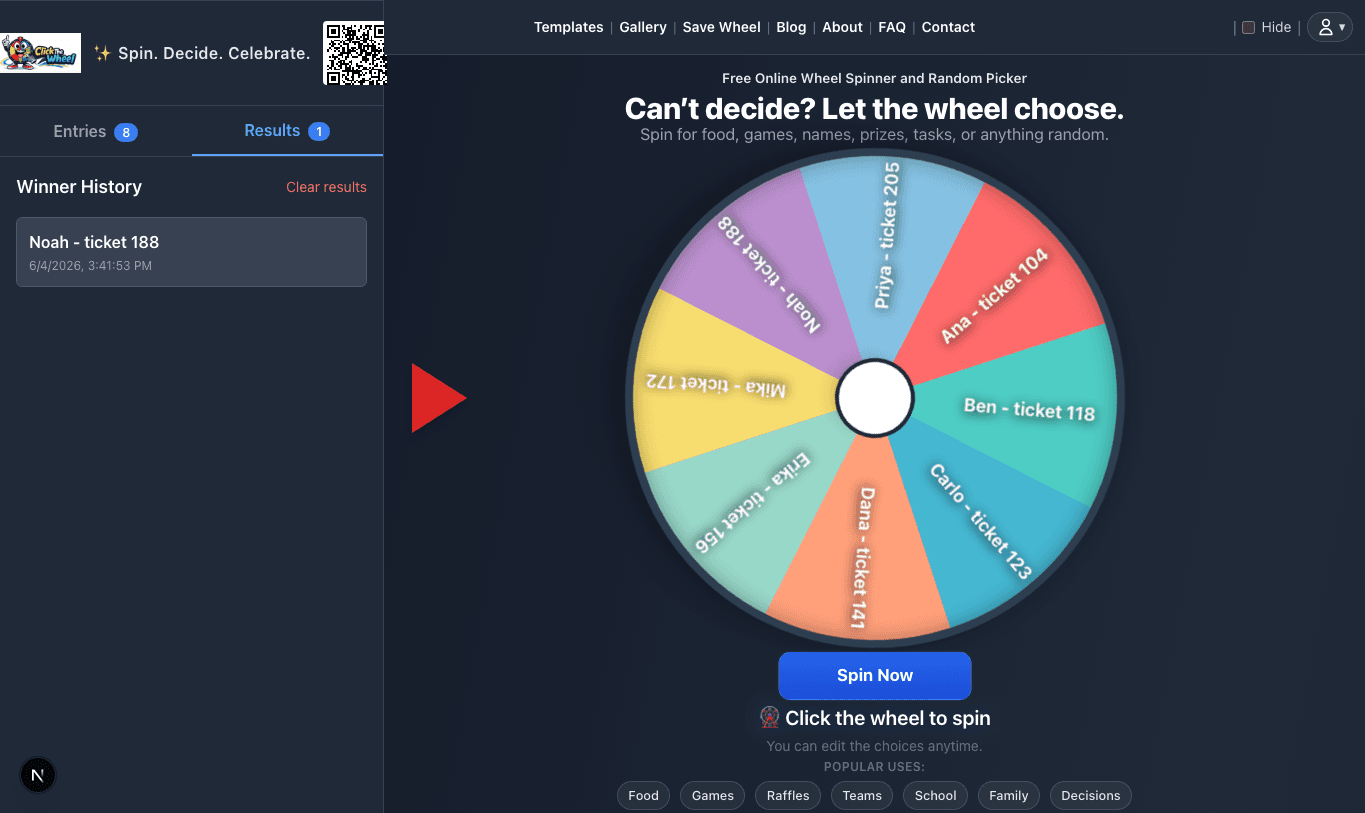
- Winner log
- Entry list proof
- Common mistakes
- Proof checklist
- FAQ
- Final thoughts
Why Proof Matters
People trust what they can see.
A live wheel draw already helps because the selection is visible. But after the live moment ends, people may still ask questions.
Proof helps answer:
- Who won?
- When was the draw?
- How many entries were included?
- Was the wheel shown?
- Was there a respin?
- Were winners removed?
Good proof protects both the host and the participants.
The Simple Version
Before the draw:
- Clean the entry list.
- Prepare screen recording or livestream.
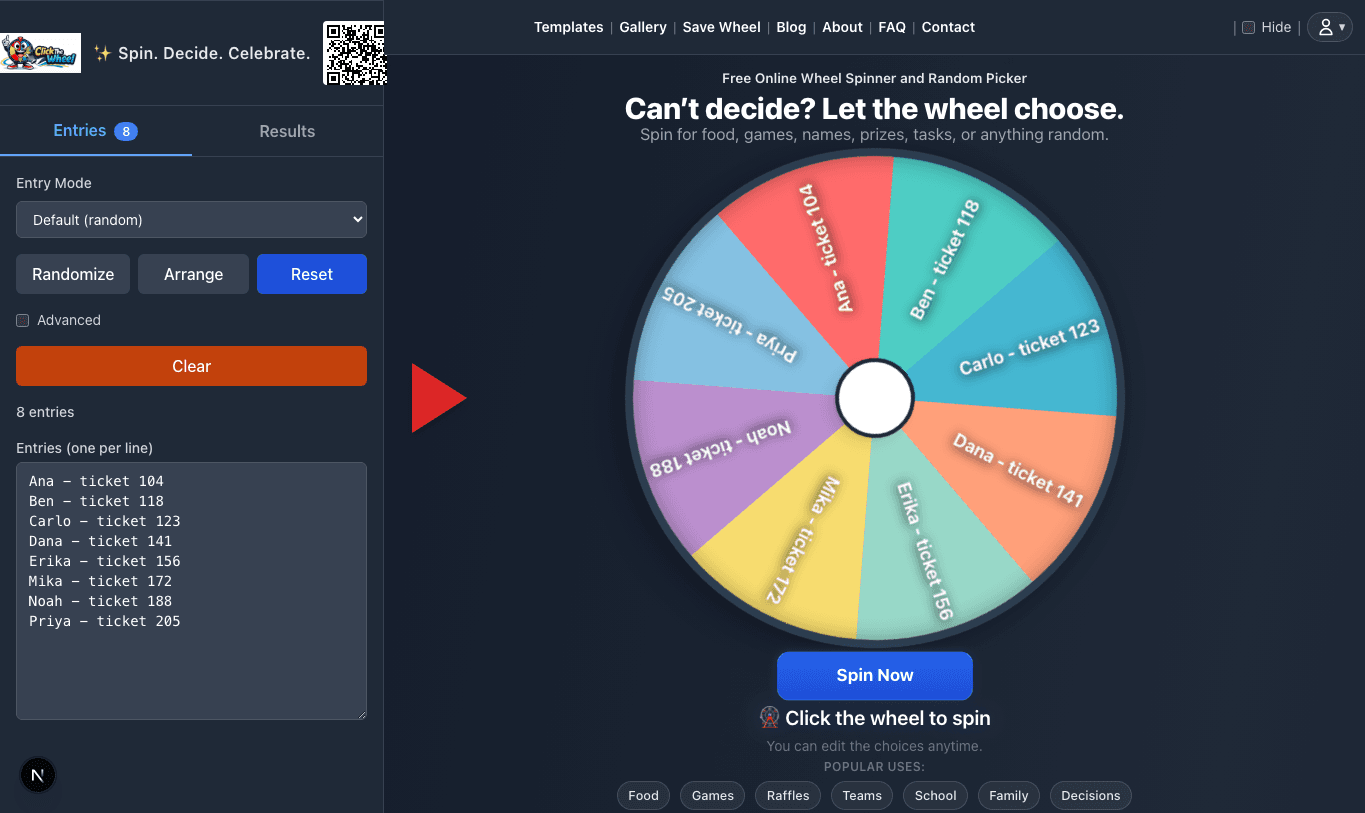
- Show the entry count.
- Spin the wheel visibly.
- Record each winner.
- Screenshot final winners.
- Save the file or replay.
That is enough for most small to medium draws.
What Proof Should Show
Good proof should show the important parts of the process:
- the final list or entry count
- the wheel before spinning
- the actual spin
- the selected winner
- the winner log
- the date or context, if possible
It does not need to be fancy. It needs to be understandable.
Screen Recording
A screen recording is one of the easiest proof methods.
It captures:
- list setup
- wheel spin
- winner result
- removing winners
- final list
Before recording, close private tabs, notifications, and unrelated windows. Keep the screen clean.
If you are using ClickTheWheel, open the wheel, confirm your entries, start recording, then begin the draw.
Screenshots
Screenshots are useful for smaller draws.
Take screenshots of:
- entry count
- winner result
- final winner list
- backup winners, if any
Screenshots are easier than video, but less complete. For larger public giveaways, use screen recording or livestream replay.
Livestream Replay
If you host on Facebook, YouTube, TikTok, Zoom, or Google Meet, the replay can serve as proof.
During the live draw, announce:
“We are recording this draw so participants can review the result later.”
Then make sure the replay is saved.
If the platform does not automatically save, use a separate screen recording.
Winner Log
Keep a simple winner log beside the draw.
Example:
Winner 1: Dana
Winner 2: Felix
Winner 3: Ana
Backup 1: Carlo
Backup 2: Erika
A winner log is especially useful when picking multiple winners.
Do not rely on memory. Live draws move quickly.
Entry List Proof
For public giveaways, keep a copy of the final entry list.
You may not need to publish the full list if it contains private information, but you should save it internally.
For privacy, avoid showing emails, phone numbers, or sensitive data during live draws. Use names, usernames, or entry IDs instead.
Common Mistakes
Recording too late
Start recording before the first spin, not after the winner appears.
Showing private information
Hide emails, phone numbers, and private details before sharing screen.
Not saving the replay
Check that your recording actually saved.
Not recording corrections
If you fix an entry issue, explain it while recording.
Losing the winner list
Save the winner log immediately after the draw.
Proof Checklist
- [ ] Entry list is final.
- [ ] Entry count is ready to show.
- [ ] Private information is hidden.
- [ ] Screen recording or livestream is ready.
- [ ] Winner log is open.
- [ ] The wheel is visible before spinning.
- [ ] Each winner will be recorded.
- [ ] Final winners will be saved.
- [ ] Backup winners are documented if used.
When ClickTheWheel Helps
ClickTheWheel helps because it makes the draw visible and easy to follow. Participants can see the wheel, watch the spin, and understand the result.
For event ideas, browse the Examples Library.
FAQ
Do I need to record every giveaway?
For small private games, no. For public giveaways or prize draws, it is strongly recommended.
Is a screenshot enough?
For small draws, yes. For larger public draws, video proof is better.
Should I show the full entry list?
Only if it does not expose private information. You can show entry count instead.
What if I forgot to record?
Save what you can: final winner list, timestamp, screenshots, and entry list.
Can I use a livestream replay as proof?
Yes, if it clearly shows the draw process and results.
Final Thoughts
Proof should not make a giveaway feel heavy.
It should make it feel safer.
A simple recording, screenshot, or winner log can prevent confusion and protect the happy moment.
Run your next live draw on ClickTheWheel, prepare proof before spinning, and keep the experience fun and credible.
Relevant app screenshots
These screenshots are shown only for articles where the image directly supports the giveaways workflow: setup, result proof, result history, or settings. They are not generic decorations.